Connection & reputation
Senders on Spamhaus ZEN are turned away before they can send anything. Spamhaus DBL, ZRD and the hash blocklist then check every domain, link and file.
Obsidian Email Security protects Microsoft 365, Google Workspace and Exchange. Every message goes through Spamhaus reputation, antivirus, authentication and content checks, and an AI model reviews the uncertain ones. We run the service; you point your mail at it. There is nothing to install.
Operated by Integrators Resource, Minneapolis.


Each check adds points for suspicious findings and removes points for reassuring ones. Your policy sets the thresholds. If one check breaks, the rest still decide, so mail is never lost.
Senders on Spamhaus ZEN are turned away before they can send anything. Spamhaus DBL, ZRD and the hash blocklist then check every domain, link and file.
SPF, DKIM, ARC and DMARC with proper alignment. A spoof of a domain that publishes p=reject gets caught even when the sender is on your allow list.
ClamAV scans every message and attachment. Sanesecurity's third-party signatures add coverage for phishing and malware campaigns.
Blocks dangerous file types, including ones hidden inside archives. You choose whether Office macros and password-protected archives are quarantined, scored or allowed.
Flags links whose visible text points somewhere other than where they really go. Also catches lookalike domains and outsiders using the display name of one of your VIPs.
Heuristic rules look for BEC language, payment requests and urgency. A Bayesian filter learns from what your users report and release.
For mail the rules can't settle, a language model on our own servers reads the message and its technical facts. It returns a verdict and its reasons.
Send your mail through Obsidian, connect it to your mailboxes through each platform's API, or both. The same checks, policies and quarantine apply either way. Nothing runs on your side.
Change your MX records to mx1.obsidiansuite.net. Mail arrives at Obsidian first, is filtered during the SMTP conversation and is relayed to your mail server over TLS.
You grant Obsidian access to your tenant through Microsoft Graph, a Google Workspace service account or Exchange Web Services.
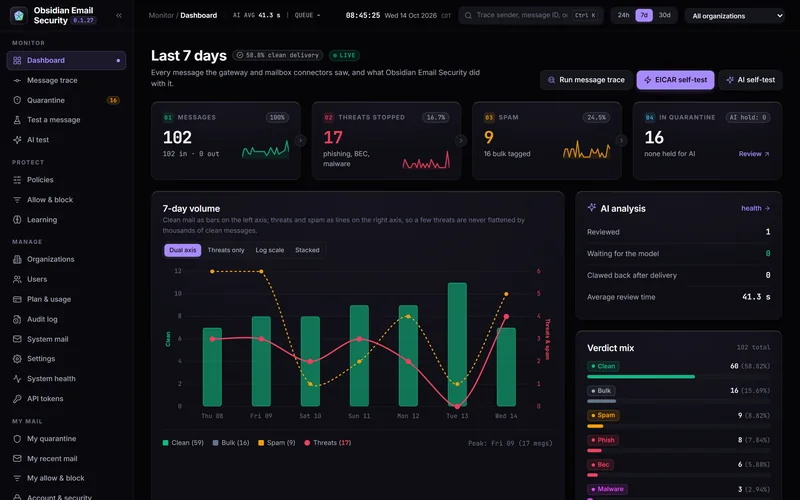
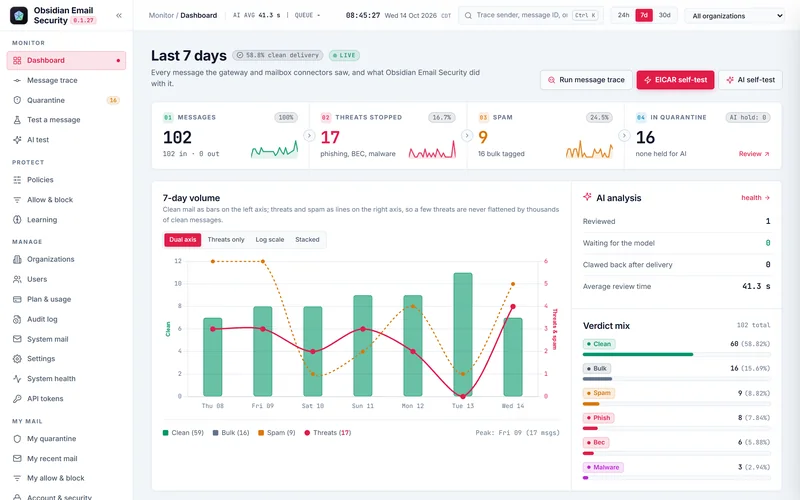
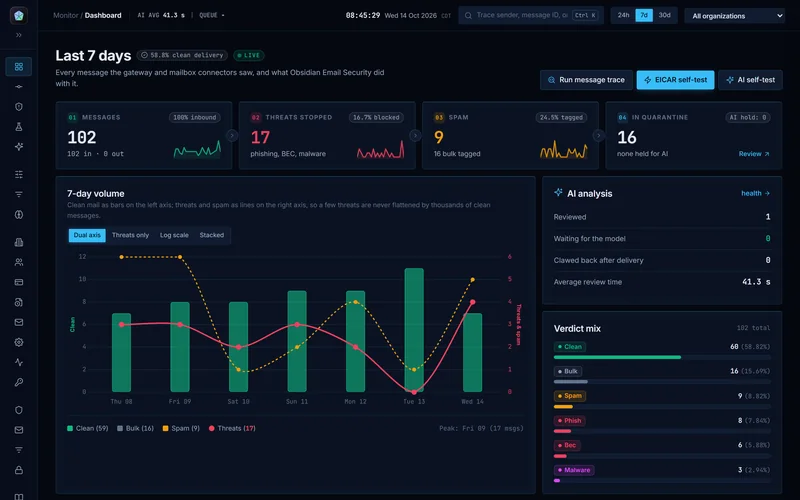
The dashboard follows mail from arrival to quarantine, with trend lines for the last 24 hours, 7 days or 30 days. The volume chart can put threats on their own axis, so a handful of phishing messages is never flattened by thousands of clean ones.

Obsidian asks the model only when its answer can change the outcome. That means mail in the grey zone, messages that look like business email compromise, a VIP's name from outside, or a first-time sender with links. The model sees the mail and its technical facts. Its verdict, confidence and reasoning appear at the top of the message.

Every user has a portal at portal.obsidiansuite.net. It works on a phone as well as a desktop. Users see what was held for them, release what they were expecting, and report anything that got through.

Your IT team signs in at portal.obsidiansuite.net. Each organization is separate: its own domains, policies, allow and block lists, connectors and quarantine. Your administrators see only your mail, and no other customer can see it.
Every check, every rule and every point, with the reason for the final decision. You can answer "why was this blocked?" in seconds.
Thresholds, actions for each verdict, attachment rules, AI settings, and which verdicts users may release themselves.
Administrators manage the organization; users see and release only their own mail.
Statistics, message search, release and list management over a token-based API. We issue tokens scoped to your organization, for your PSA and your own scripts.
Every sign-in, release, policy change and setting change is recorded with the person, the time and the real client IP.
Every setting, policy field, rule and header is documented, with guides for connecting Microsoft 365, Google Workspace and Exchange.
Obsidian runs on servers Integrators Resource owns and operates, in the United States. Message content is processed there and is not sent to an outside AI or analytics service. The only outside lookups are DNS queries: Spamhaus reputation checks, which send domains, IP addresses and file hashes, and the SPF, DKIM and DMARC records of senders.
No public cloud or third-party mail filter underneath. We run the servers and the AI model ourselves.
Connector credentials, API keys and two-factor secrets are encrypted at rest. Passwords are hashed with Argon2.
Built-in Let's Encrypt certificates with automatic renewal. Delivery to your mail servers requires TLS by default.
Every customer has its own quarantine, lists and policies. Quarantined mail and logs are deleted automatically when their retention period ends.
There is no server to build and nothing to patch. We set up your organization, you change a few records, and your mail is filtered from the next message on.
mx1.obsidiansuite.net. Mail flows through Obsidian from then on.No. In gateway mode you change your MX records and add a connector or transport rule so your mail server accepts mail from Obsidian. In API mode you grant access through Microsoft or Google. We run everything else.
No. The model runs on servers Integrators Resource owns and operates. Message content is never sent to an outside AI provider.
In the United States, on Integrators Resource's own servers. Quarantined mail stays there until it is released, deleted or its retention period ends.
Mail is never lost. If one check fails, it is marked as errored and the others still decide. If the antivirus is down, the sending server is asked to try again later, which mail servers do automatically. If the AI is unreachable for longer than the maximum hold time, the rules decide.
Yes, from the portal or from a digest email. Each policy controls which verdicts users may release. Viruses, malware and phishing always need an administrator.
Yes. Mail your servers send out through Obsidian is checked for viruses and spam, so a compromised account can't get your domain blocklisted. Checks that only make sense for incoming mail, such as impersonation and AI review, are skipped.
Yes. A secure message reaches the recipient as a link. It is encrypted before it leaves the sender, and the key is only in the link, so our servers hold the message without being able to read it. The recipient proves their address with a code sent to it, reads the message in the browser and can reply securely. Messages expire after the time the sender chooses, up to 90 days.
Microsoft 365, Google Workspace and Exchange Server, alone or mixed. Any mail server that can receive mail over SMTP works in gateway mode.
Tell us about your environment: Microsoft 365, Google Workspace, Exchange, or a mix of them. We'll show you how Obsidian fits.