A menu in the login box
Click the box and pick the account. Nothing is filled until you choose, and only on the site the login was saved for.
Obsidian Vault keeps your logins, cards, notes, authenticator codes and passkeys, and fills them in for you in your browser, on Windows and on your phone. Everything is encrypted on your own device with your master password before it is saved, so nobody else can open it. Not us, and not anyone who breaks into our servers.
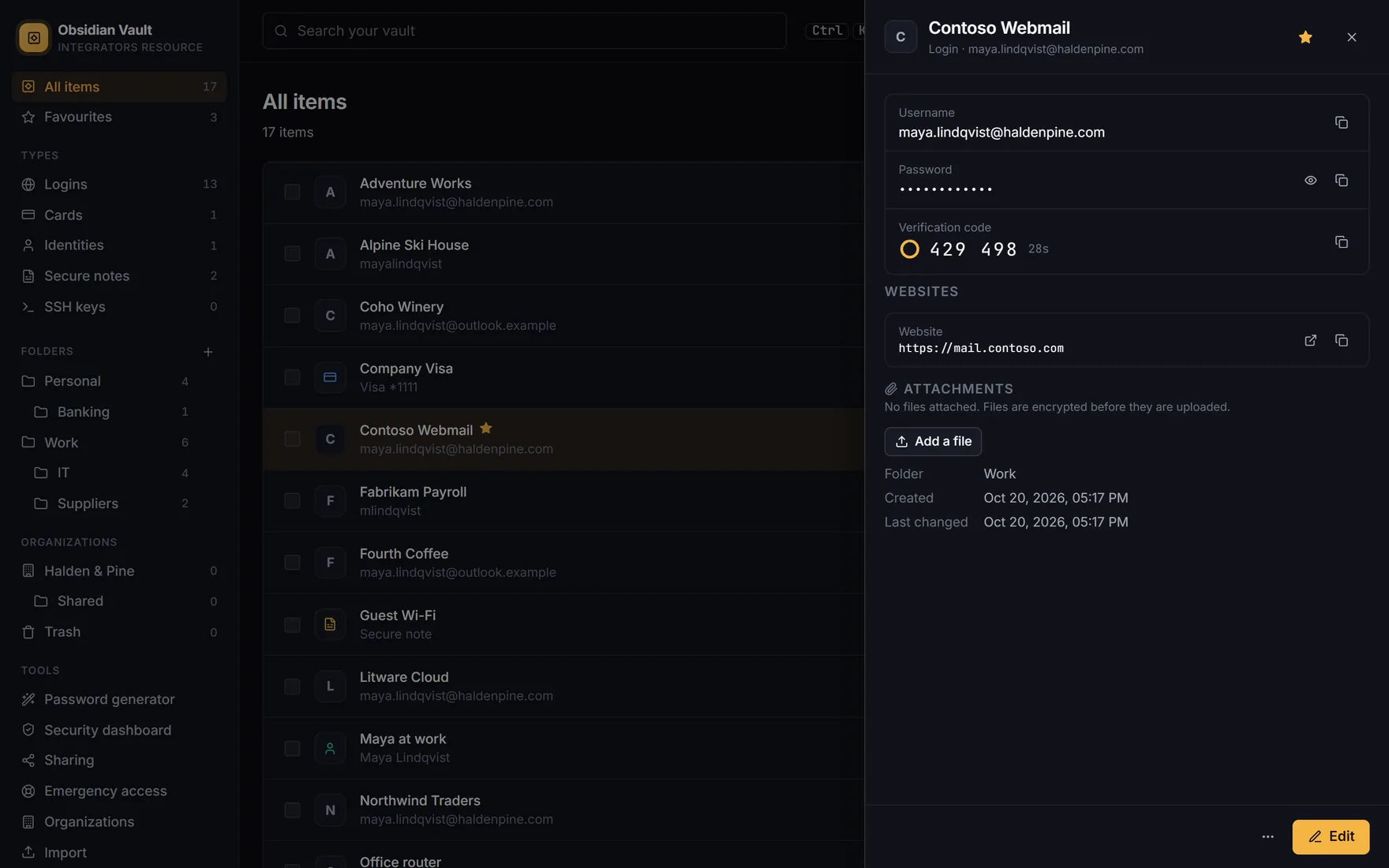
Everything comes with you: logins, secure notes, cards, addresses, folders, favourites and authenticator codes. The file is read in your browser and encrypted there; you see what was found before anything is saved.
Coming from somewhere else? Bitwarden, 1Password, Dashlane, KeePass and the passwords saved in Chrome, Edge, Firefox or Safari import the same way. How to import
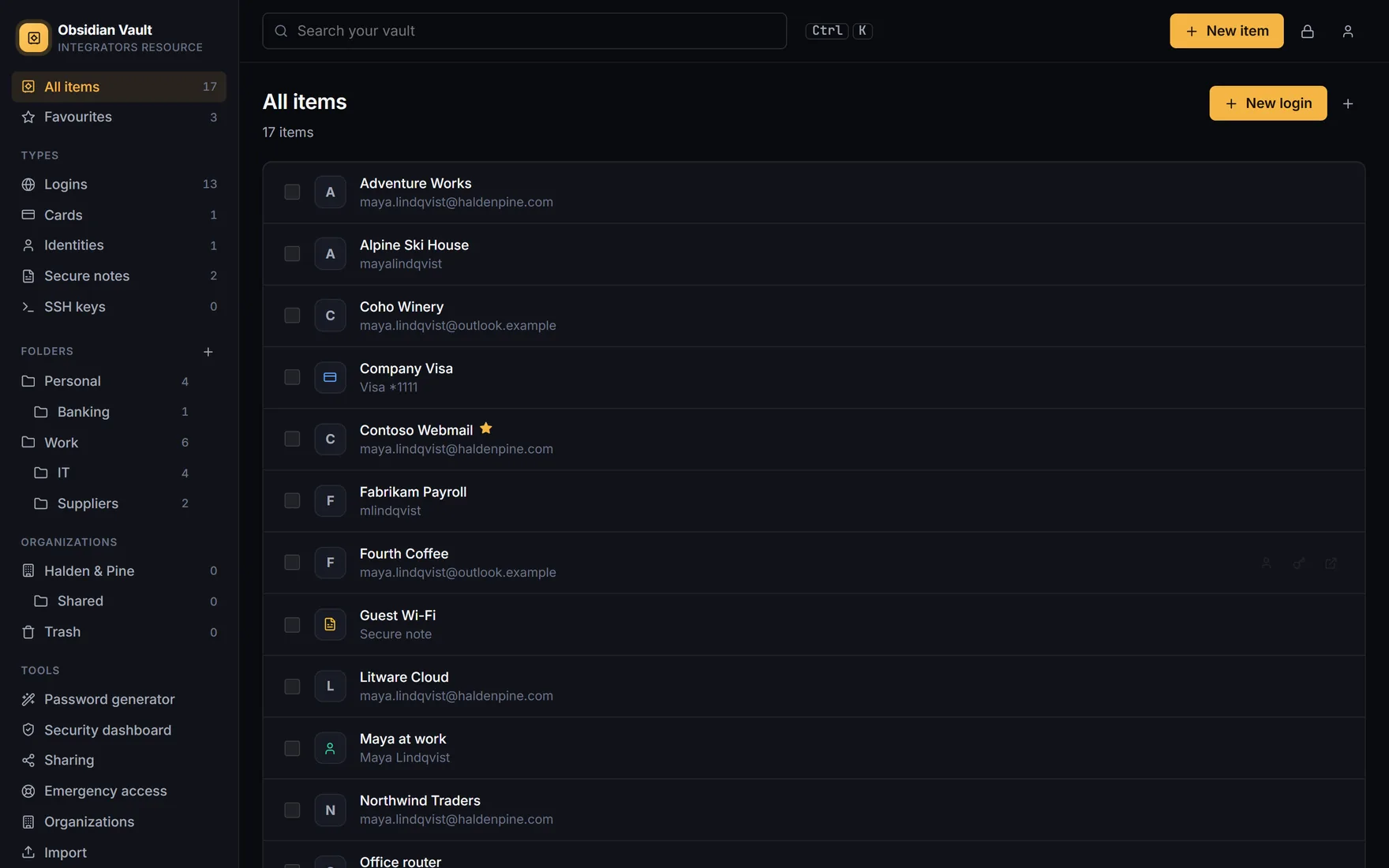
One vault for the things you need to get into your accounts, pay and prove who you are. Find anything by typing a few letters.
Username, password, websites, a verification code and passkeys, with custom fields and the old passwords it replaced.
Card number, expiry and security code, filled into checkout forms on a click.
Name, address, phone and email for sign-up and delivery forms.
Secure notes for anything else, from door codes to licence keys, and your SSH key pairs.
The generator makes a new password whenever a site asks for one, and the vault remembers it so you never have to.
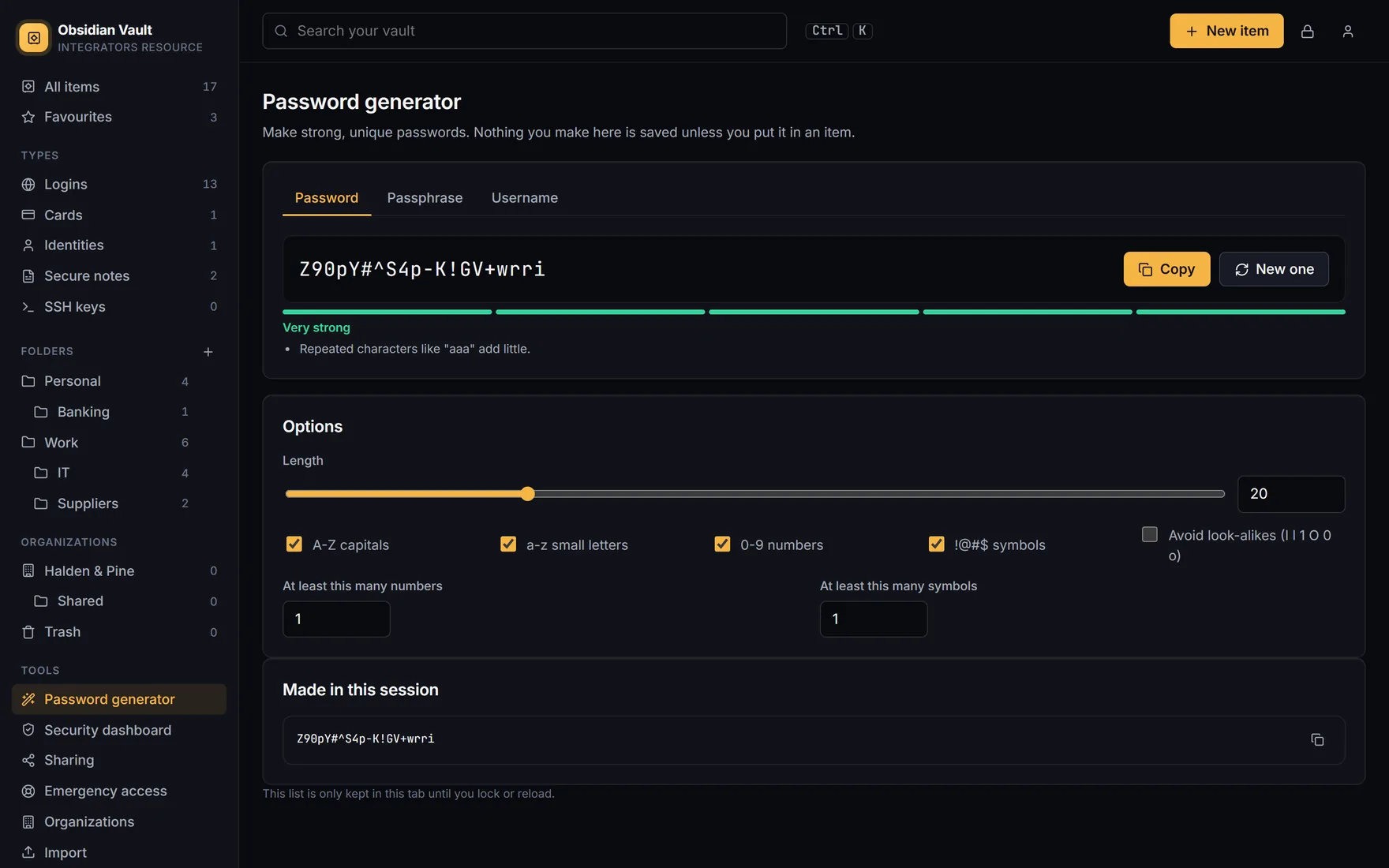
The browser extension and the apps put your username, password and code into the right boxes, and offer to save what you type on a new site.
Click the box and pick the account. Nothing is filled until you choose, and only on the site the login was saved for.
Signed up somewhere new, or changed a password? A bar asks whether to save it, so the vault stays up to date.
Sign in to sites with a passkey instead of a password. The vault keeps it and offers it in the browser, on Android 14 and on iOS 17.
When a site asks for the 6-digit code after your password, the vault fills that in too. No phone to pick up.
For programs that aren't websites, one shortcut types the username and password into the window in front of you.
Android and iPhone offer your logins above the keyboard in apps and websites, unlocked with your fingerprint or face.
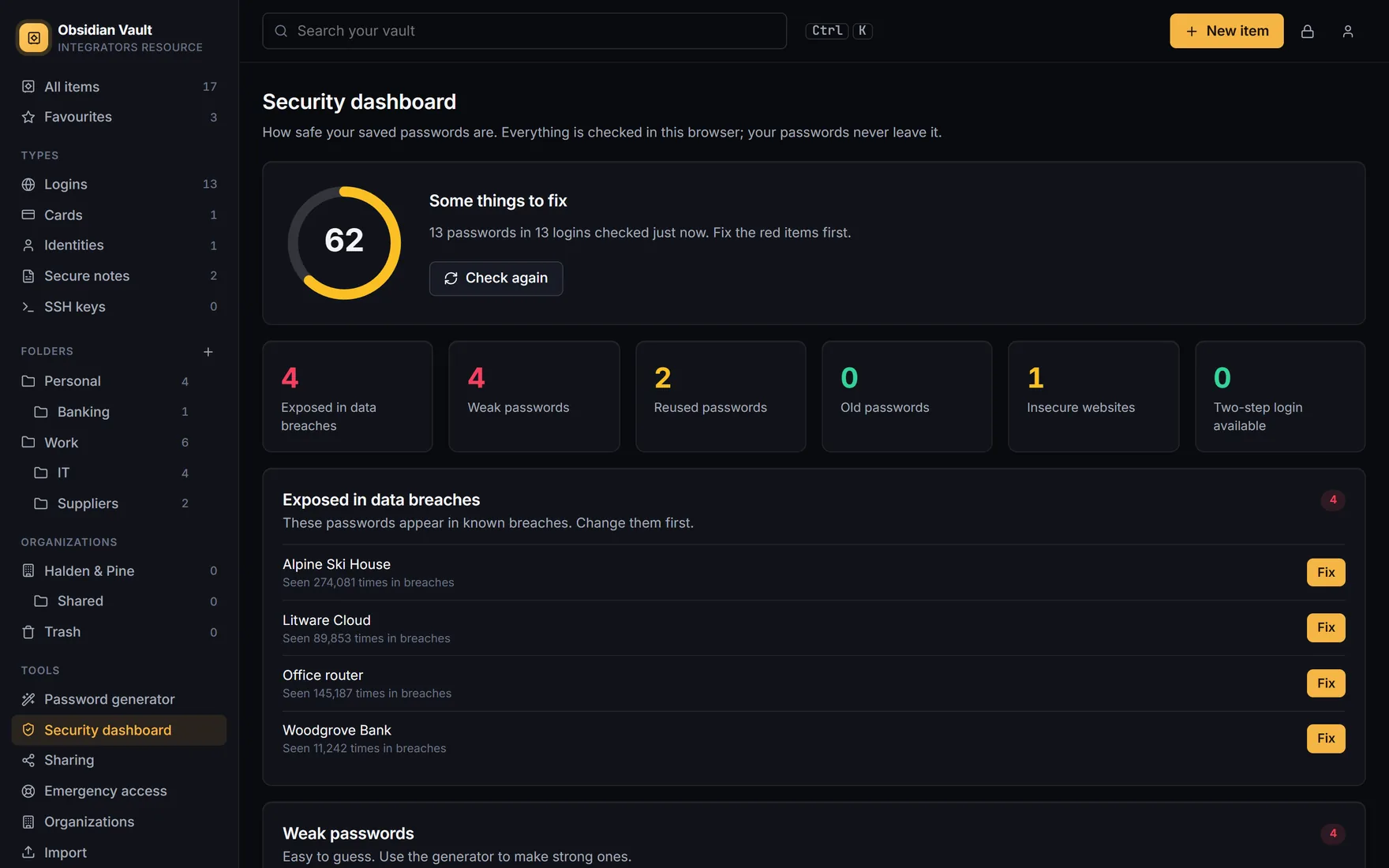
A score out of 100 and a short list to work through, worked out on your device from your own vault.
Every finding has a Fix button that opens the item, with the generator one click away.
Your master password never leaves your device. It makes the keys that lock and unlock your vault right there, and only scrambled data is sent to us. If our servers were ever broken into, there would be nothing readable to take.
It is stretched with Argon2id (64 MiB, 3 passes) into one key that proves who you are and a separate key that unlocks the vault. Only the proof is sent, and we store even that only scrambled again.
Each item is encrypted with AES-256-GCM under a key of its own, so sharing one item never exposes another.
Families, teams and one-to-one shares use P-256 public-key encryption, checked with a five-word fingerprint phrase.
That is the point: we can't recover a forgotten master password. Save a hint, set up emergency access, or let your organization enrol you for recovery.
An authenticator app, a security key or passkey, a code by email, and a recovery code to print and keep.
A browser or phone that has never signed in can be asked for an emailed code, and you are told about every new sign-in.
Windows Hello, your fingerprint or face, or a PIN. The vault locks itself after the time you choose.
Every plan has unlimited items on all your devices. Paid plans start with a 30-day free trial. If a paid plan ends, you keep everything and drop back to the free features; nothing is deleted.
One person
$0a month
No card, no time limit
One person
$2.50a month
$30 billed yearly
Up to 6 people
$4a month
$48 billed yearly, for all 6
Per person
$3a person a month
$36 a person, billed yearly
Per person
$5a person a month
$60 a person, billed yearly
Prices in US dollars, billed yearly by card through Stripe; the monthly price is the yearly price divided by 12. Family, Team and Business belong to an organization: create your account, then create the organization under Organizations. Team and Business count the people in them, and someone added during the year is charged for the rest of it.
One account everywhere. Sign in once on each device; changes reach the others within seconds.
The apps are on their way to the stores. These buttons will take you there.
Your whole vault at vault.obsidiansuite.net, with nothing to install: every item, sharing, organizations, import and export, and your settings.
Open the web vaultAutofill, saving new logins, the generator, verification codes and passkeys, right in the browser. Brave installs from the Chrome Web Store.
The same extension for Firefox 128 or later, from Firefox Add-ons.
Firefox Add-ons Coming soonYour vault in its own window and the tray, unlocked with Windows Hello, with auto-type for programs, and copied passwords cleared from the clipboard.
Download for Windows Coming soonFills logins and passkeys in apps and Chrome through Android's own autofill, unlocked with your fingerprint or face. Passkeys need Android 14.
Google Play Coming soonYour logins and passkeys in iPhone AutoFill, in Safari and in apps, unlocked with Face ID or Touch ID. Passkeys need iOS 17.
App Store Coming soonNo. Your vault is encrypted on your device with keys made from your master password, and the master password never reaches us. We store data we cannot decrypt. We do see your email address, your name if you give it, your devices and when they sign in; the privacy policy lists everything.
We can't reset it, because we never have it. Ask for your hint on the sign-in page, and plan ahead: a person you trust can be given emergency access, and in a team or business organization an admin can set a new master password for you if you enrolled in account recovery.
Export a CSV file from LastPass, then in the web vault open Import (under Tools) and choose the file. Logins, notes, cards, addresses, folders and authenticator codes all come across. See Importing and exporting.
No. Obsidian Vault is a hosted service only, run by Integrators Resource at vault.obsidiansuite.net. There is no self-hosted edition.
Free is free for one person, for as long as you use it. Premium is $2.50 a month ($30 a year), Family $4 a month ($48 a year) for up to 6 people, Team $3 and Business $5 a person a month ($36 and $60 a year). Paid plans are billed yearly and start with a 30-day free trial. See Plans.
Your account drops back to the free features. Nothing is deleted: your items stay in your vault, and an organization whose plan ends stays readable until it is renewed.
Yes. Export your vault as an encrypted file with a password of its own, or as a plain JSON or CSV file for another password manager. Then delete your account in Settings.
No. Obsidian Vault is our own software with its own design, made by Integrators Resource. It imports Bitwarden exports, but its apps don't connect to Bitwarden servers.
Obsidian Email Security keeps phishing out of your users' inboxes, and Obsidian Remote lets your technicians reach every PC.