Encrypted on your PC
The mail cache is encrypted with AES-256. Its key is sealed to your Windows account, so the file is useless if it is copied off your PC.
Obsidian Mail Client puts Mail, Calendar, People and To Do in one window, with the ribbon and keyboard shortcuts you already know. It blocks tracking pixels, encrypts the mail it keeps on your PC and filters spam with a filter that learns from you. Your mail stays between your PC and your mail provider.
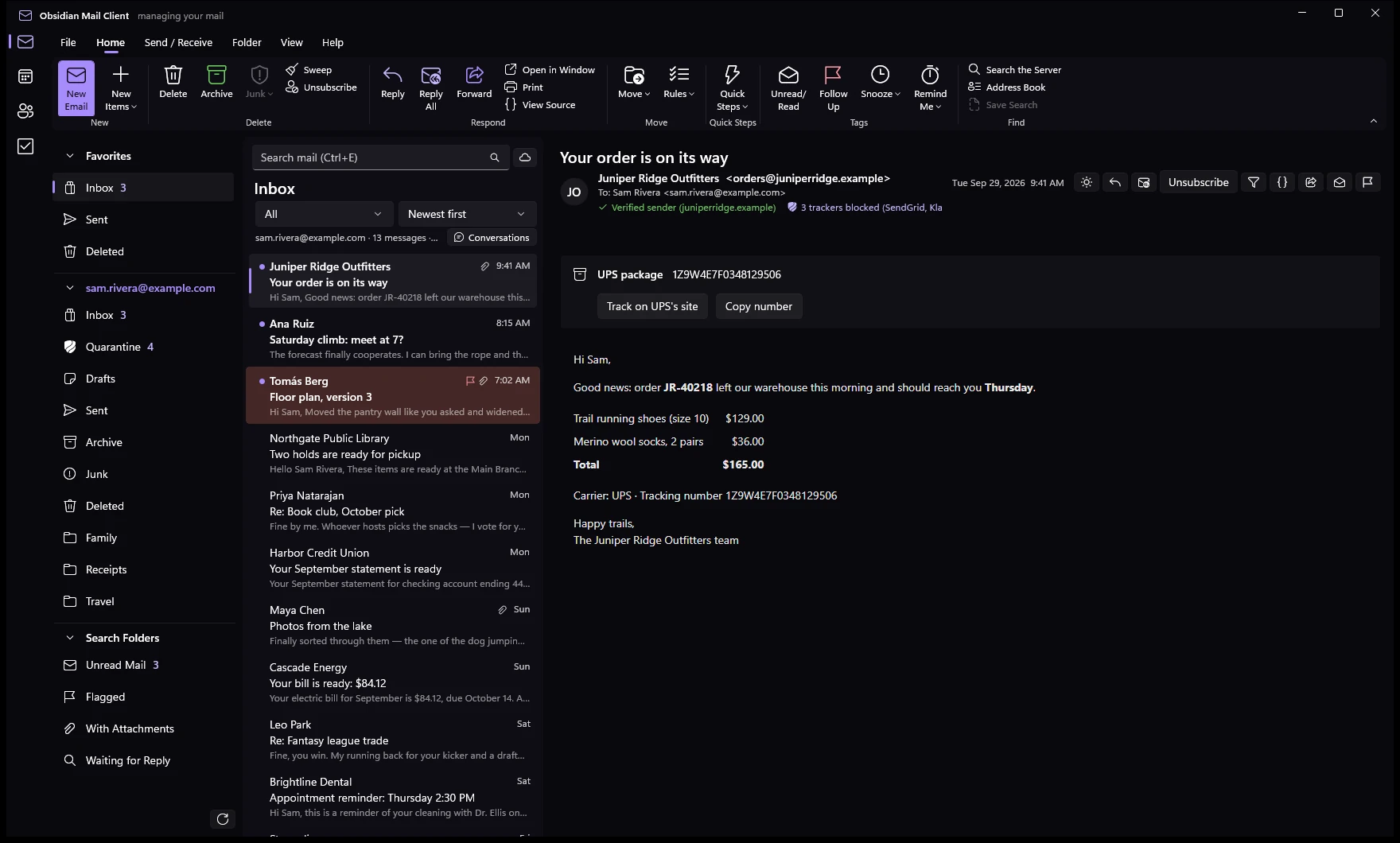
The rail on the left switches between the four, as in Outlook. With a Microsoft account they sync with Outlook.com; contacts and tasks also work on their own, kept on your PC.
Several accounts in one folder pane with All Inboxes, favorites, conversations, and a reading pane on the right, at the bottom or off.
Day, work week, week and month. Recurring events, reminders, conflicts shown as you pick a time, and invitations answered from the message.
Contacts and groups, contact cards, and addresses completed as you type from everyone you write to.
Tasks with steps, due dates, reminders and lists. Flag a message and it shows up as a task.
If you have used Outlook, you already know where everything is. The ribbon has the same tabs, the shortcuts are the same, and right-clicking a message or a folder offers what you expect.
from:, subject:, has:attachment or received:this week, or let the Filters button write them for you..pst or .ost, an .mbox or .eml files straight into an account..mbox, a calendar to .ics and contacts to .vcf, or everything into an Obsidian Data File: our own .pst, encrypted with a password if you like, that opens in its own window.There are no ads and no AI reading your messages. The app keeps a copy of your mail so it opens instantly and works offline, and that copy is encrypted. Senders who try to find out when you open their mail find out nothing.
The mail cache is encrypted with AES-256. Its key is sealed to your Windows account, so the file is useless if it is copied off your PC.
Turn on the app lock and the app asks for your face, fingerprint or PIN when it starts, and again whenever it comes back from the tray.
Pictures stay off until you ask for them, and the invisible pixels that report when you read a message stay blocked even then.
Links open without the tracking tags that newsletters add to see who clicked what.
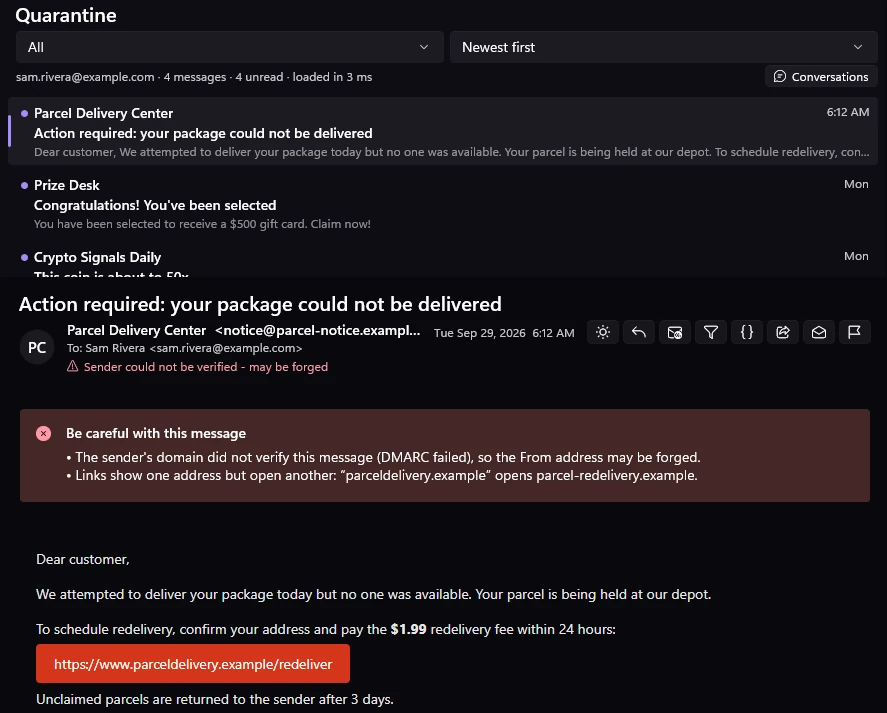
Every message shows whether it passed SPF, DKIM and DMARC. Verified brands show their real logo, so a fake one stands out.
S/MIME as in Outlook: sign or encrypt any message with a certificate from Windows' own store. Encrypted mail is never saved decrypted.
Every new message is scored on your PC by content rules and a filter that learns from what you mark. Spam goes to a Quarantine folder on your account, so you can look it over and release anything that belongs in your Inbox.
The tools that make Outlook.com and Outlook fast to work with, in one app.
Clear out one sender: everything now, everything from now on, all but the latest, or anything older than a few days.
Send a message away until later today, tomorrow, the weekend or a time you choose. It comes back unread, on top.
A few seconds to take a message back, or schedule it for the morning. Drafts save themselves as you type.
Several actions in one click, such as reply and delete, or mark read and move. Each one gets its own shortcut.
Several signatures per account, one for new mail and another for replies, plus templates for what you write often.
Wrote "attached" and attached nothing? You're asked before it goes. Only your own words count, not the quoted mail.
Unread, flagged and mail with attachments across every account, plus any search you save.
Sort mail as it arrives, or run a rule on what's already there. Create one straight from a message.
Settings, lists and optionally your mail in one password-protected file, to move to a new PC.
Built for Windows with WinUI 3 and .NET, not a web page in a frame. It starts quickly, stays in the tray and works with the rest of Windows.
Set it in Default apps: mailto: links start a message and .eml files open in their own window.
New mail alerts with Reply, Mark as read and Delete right in the notification.
The unread count on the taskbar button, and a jump list for a new email or a new event.
The app checks for updates, verifies their signature and asks before installing: now, later, or skip.
Features you won't find in Outlook. Already installed? The app offers you the update itself.
The first message from someone new waits in a Screener folder. Let them in once, or screen them out for good. People you know are never screened.
A warning when a known name writes from an address it has never used, or when a domain only looks like one you trust.
Pick a day as you send. If nobody has answered by then, you get a reminder and the message waits in Search Folders > Waiting for Reply.
Which senders try to track you, with which tracking services, and how often the app stopped them.
Tracking numbers in shipping mail turn into a card that links to the carrier. Check digits are verified, so order numbers aren't mistaken for them.
Receipts and bills from your mail, gathered into a list of what you pay, how often, and roughly what it adds up to each month.
The services you have accounts with, found in verified mail, and which of them have had a data breach. Your address is never sent to check.
Look inside a Word, Excel or PowerPoint attachment without opening it. A locked-down helper reads it and no macro or link can run.
A different address for every site you sign up to, using plus addressing. See who shared yours, and switch off one that gets spam.
Light, dark, or follow Windows, with messages darkened to match. The lists come in Roomy, Cozy and Compact.
Encrypted mail to anyone: the message stays sealed on the Obsidian portal and the recipient gets a link to read and reply. Needs an Obsidian Suite account; how it works.
Version 0.1.39. Installed once, it keeps itself up to date.
Downloads ask for a user name and password. Ask us for access.
Installs for you alone, without administrator rights. The right choice for most people.
Download the installerInstalls for every user on the PC. Needs administrator rights; deploy it with Intune, Group Policy or your own tools.
Download the MSIWindows 10 (version 1809 or later) or Windows 11, 64-bit.
Outlook.com, Hotmail and Live accounts and Microsoft 365 work or school accounts sign in with Microsoft. Your company’s Exchange Server and your Obsidian Mail Server connect over Exchange ActiveSync. Gmail works with an app password, and any other provider works over IMAP. Type your address and the app works out which it is, as Outlook does. You can add several accounts and see them side by side.
No. Your mail goes between your PC and your mail provider. The spam filter runs on your PC, there is no AI reading your messages and no advertising.
No. The client works with your existing mail on its own. Obsidian Suite is our hosted email security service for organizations; the Secure link feature is the only part that uses it.
Yes. File > Open & Export imports an Outlook .pst or .ost file, an .mbox or .eml files into a folder of one of your accounts, keeping dates and read state.
The app checks for a new version when it starts and at an interval you choose. It verifies the update's signature before it offers it, and asks whether to install now, later, or skip that version.
For now, yes. The installer's code-signing certificate is being issued, and until it is, Microsoft Defender SmartScreen may say it doesn't recognize the app. Choose More info, then Run anyway. Updates installed by the app itself are always signature-checked.
No. Obsidian Mail Client is built for Windows only.
Obsidian Suite filters mail for Microsoft 365, Google Workspace and Exchange before it reaches anyone's inbox, with the same filter and an AI model that explains every decision.